Load balancing Citrix Virtual Apps & Desktops (StoreFront)
Updated on May 12, 2026
•
Published on July 15, 2024
Benefits of load balancing Citrix Virtual Apps & Desktops (StoreFront)
While many components exist in the Citrix Virtual Apps & Desktops (CVAD) stack, load balancing the Citrix StoreFront web interface is key to ensuring a reliable entry point for users.
Load balancing Citrix StoreFront provides three primary advantages:
- High Availability (HA): Load balancing eliminates the single point of failure risk. The load balancer continuously monitors the health of StoreFront servers; if a server crashes or goes offline for maintenance, the system automatically reroutes traffic to healthy nodes. This failover is typically seamless, ensuring users maintain uninterrupted access to their resources.
- Optimal performance and user experience: By distributing incoming traffic across the entire server pool, load balancing prevents any single server from becoming a performance bottleneck. Using intelligent algorithms (such as Least Connection) the load balancer ensures that authentication and app-launch requests are handled by the most available resource. This results in faster login times and a more responsive interface, even during “logon storms” or peak hours.
- Seamless scalability and maintenance: Load balancing provides the flexibility to grow or service your infrastructure without impacting the production environment. As your user base grows, you can add new servers to the pool; the load balancer will immediately begin utilizing the extra capacity. Furthermore, administrators can drain or take specific servers out of rotation to perform patching and updates. Once the work is complete, the server is put back into the pool with no perceived downtime for the end-user.
About Citrix Virtual Apps & Desktops
The CVAD architecture is designed to decouple the user’s physical device from their applications and operating system. The stack includes:
The Access Layer: The entry point
This is how the user connects from the outside world to the internal resources.
- Citrix Workspace App: The client-side software (formerly Receiver) installed on the user’s laptop, phone, or thin client.
- Citrix Gateway: A secure, encrypted tunnel (SSL VPN) that provides remote access without needing a full VPN.
The Control Layer: The brains
These components manage who gets what and monitor the health of the entire environment.
- Citrix StoreFront is a centralized, enterprise-grade application that provides users with easy, point and click access to full virtualized desktops, as well as specific virtualized applications. StoreFront makes it simple to provide access to virtualized infrastructure both via its web interface as well as the cloud-based Citrix Workspace desktop application.
- Delivery Controller (DDC): The central management component. It brokers connections, authenticates users, manages VM power states, and decides which desktop a user should be assigned to.
- Site Database: A SQL Server database that stores configuration data and real-time state information (like who is currently logged in).
- License Server: Manages the product licenses.
The Resource Layer: The workhorse
This is where the actual computing happens. These are the servers or PCs that run the applications.
- Virtual Delivery Agent (VDA): A piece of software installed on every target machine (Windows Server or Windows 10/11). It allows the machine to communicate with the Delivery Controller and stream the display to the user.
- Hypervisor / Cloud Host: The platform where the VMs live (e.g., Citrix Hypervisor, VMware ESXi, Microsoft Azure, or AWS).
The Management Layer: The tools
The consoles used by IT administrators to keep the lights on.
- Citrix Director: The helpdesk and monitoring tool. It allows admins to shadow user sessions, reset profiles, and troubleshoot latency issues.
- Citrix Studio: The main configuration console used to create Machine Catalogs (groups of VMs) and Delivery Groups (assigning those VMs to users).
Together, these specialized components pass the baton to get a desktop onto a user’s screen as follows:
- The User logs into StoreFront via the Workspace App.
- StoreFront asks the Delivery Controller what resources the user is allowed to see.
- The Delivery Controller checks the Site Database and returns a list of apps/desktops.
- User clicks an icon; the Delivery Controller finds an available VDA.
- The VDA establishes a direct, high-speed connection (using the HDX/ICA protocol) back to the user’s device.
Why Loadbalancer.org for Citrix Virtual Apps & Desktops?
Choosing between a Loadbalancer.org appliance and a Citrix NetScaler (now Citrix ADC) for a CVAD environment usually comes down to a trade-off between simplicity/cost and native vertical integration.
While NetScaler might seem like the default choice because it’s a Citrix product, many organizations choose Loadbalancer.org for the following reasons:
Ease of use
- NetScaler is known for being incredibly powerful but notoriously complex. It uses a unique policy-driven logic that often requires specialized training or a dedicated networking engineer to manage.
- Loadbalancer.org‘s intuitive appliance is easy to configure, deploy, manage, and maintain, reducing complexity and the risk of human error. For a difference you can see in just minutes.
Cost
- NetScaler has a high Total Cost of Ownership (TCO) due to tiered licensing based on throughput, the need for specialized (and expensive) engineering expertise for its complex policy engine, and potential additional costs for security features like WAF or Gateway.
- Loadbalancer.org has a much lower and more predictable TCO than NetScaler, offering an uncapped throughput license, simplified management through template-driven configurations that reduce engineering time, and list price that includes all major features like GSLB and WAF straight out-of-the-box.
Consultative support
- NetScaler support is part of the massive Citrix/Cloud Software Group ecosystem. Getting to a Level-3 engineer who understands your specific load balancing edge case can sometimes take time.
- Loadbalancer.org are a specialized load balancing vendor with a proactive, tierless support team of Level 3 engineers that are more accessible, providing direct access to engineers who can assist with the entire architectural setup, not just the appliance itself.
More on what’s possible with Loadbalancer.org.
How to load balance Citrix StoreFront
The load balancer can be deployed in 4 fundamental ways: Layer 4 DR mode, Layer 4 NAT mode, Layer 4 SNAT mode, and Layer 7 Reverse Proxy (Layer 7 SNAT mode).
For Citrix StoreFront, using Layer 7 Reverse Proxy is recommended.
Virtual service (VIP) requirements
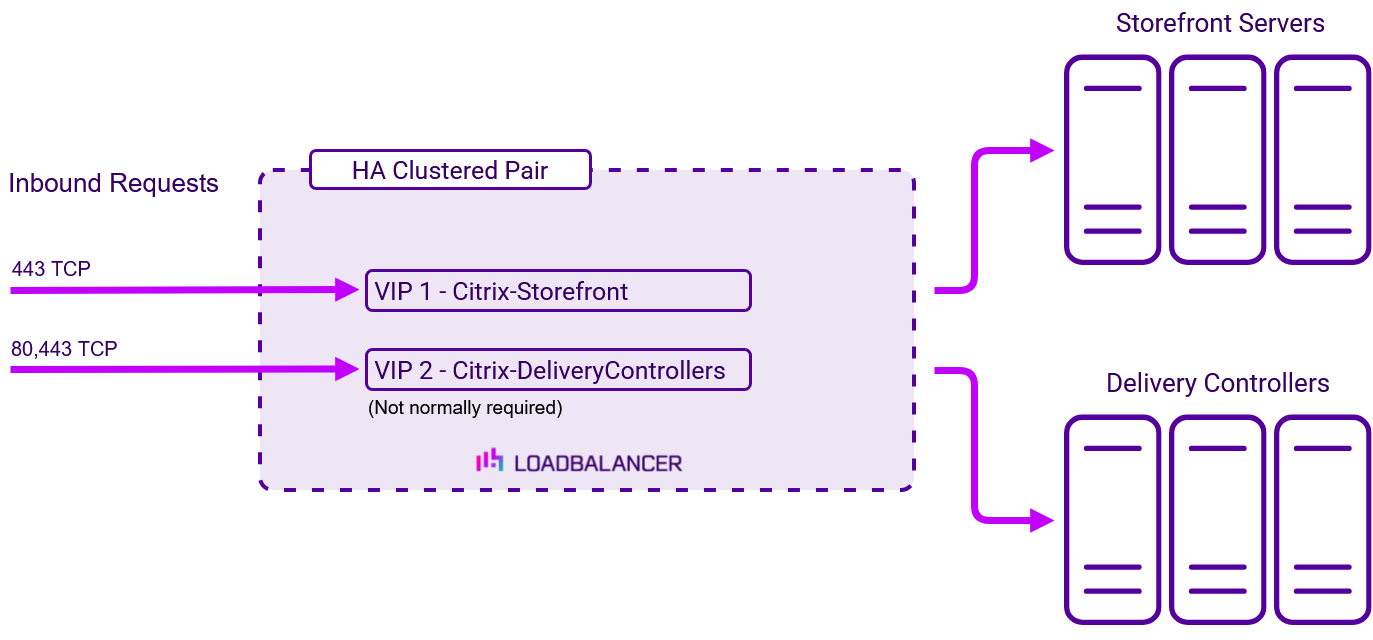
To provide load balancing and HA for Citrix StoreFront, a single VIP is required:
| Ref | VIP Name | Mode | Port(s) | Persistence Mode | Health Check |
|---|---|---|---|---|---|
| VIP 1 | Citrix-StoreFront | L7 Reverse Proxy (TCP) | 443 | Source IP | Negotiate HTTPS (GET) |
It’s also possible to load balance multiple Delivery Controllers using the load balancer appliance. However, in most cases Storefront’s built-in load balancing mechanism can be used when there is more that one controller. This is enabled by enabling the Servers are load balanced option which causes StoreFront to distribute the load between all delivery controllers or connectors by selecting a server from the list at random during each launch.
For larger or more complex setups (very high load, multiple farms, specific performance requirements) the appliance can be used to perform the load balancing. In this case, Servers are load balanced would be disabled and the following additional VIP would be required.
| Ref | VIP Name | Mode | Port(s) | Persistence Mode | Health Check |
|---|---|---|---|---|---|
| VIP 2 | Citrix-Delivery Controllers | L7 Reverse Proxy (TCP) | 80, 443 | Source IP | Connect to Port |
Load balancing deployment concept
Note
The load balancer can be deployed as a single unit, although Loadbalancer.org recommends a clustered pair for resilience and High Availability.
Load balancing topology
Layer 7 Reverse Proxy can be deployed using either a one-arm or two-arm configuration. For two-arm deployments, eth1 is typically used for client side connections and eth0 is used for Real Server connections, although this is not mandatory since any interface can be used for any purpose.
For more on one and two-arm topology see Topologies & Load Balancing Methods.
About Layer 7 Reverse Proxy load balancing
Layer 7 Reverse Proxy uses a proxy (HAProxy) at the application layer. Inbound requests are terminated on the load balancer and HAProxy generates a new corresponding request to the chosen Real Server. As a result, Layer 7 is typically not as fast as the Layer 4 methods. Layer 7 is typically chosen when either enhanced options such as SSL termination, cookie based persistence, URL rewriting, header insertion/deletion etc. are required, or when the network topology prohibits the use of the Layer 4 methods.
The image below shows an example Layer 7 Reverse Proxy network diagram:
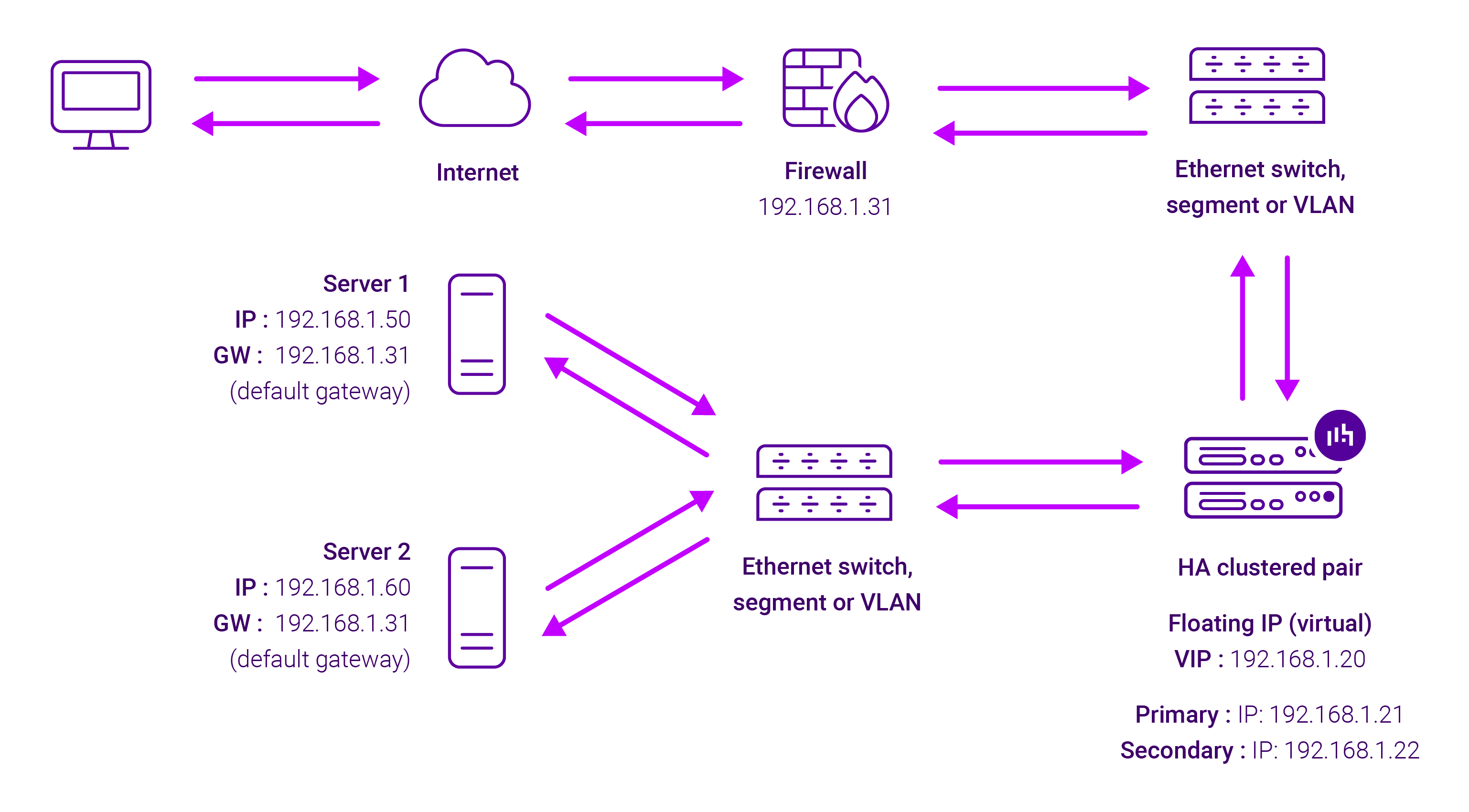
Because Layer 7 Reverse Proxy is a full proxy, Real Servers in the cluster can be on any accessible network including across the Internet or WAN.
Layer 7 Reverse Proxy is not transparent by default, i.e. the Real Servers will not see the source IP address of the client, they will see the load balancer’s own IP address by default, or any other local appliance IP address if preferred (e.g. the VIP address).
This can be configured per Layer 7 VIP. If required, the load balancer can be configured to provide the actual client IP address to the Real Servers in 2 ways. Either by inserting a header that contains the client’s source IP address, or by modifying the Source Address field of the IP packets and replacing the IP address of the load balancer with the IP address of the client. For more information on these methods, please refer to Transparency at Layer 7 in the Enterprise Admin Manual.